 TradingEdge
: AI Trading Journal & Backtesting Platform
Journal your trades, review the results, and backtest your next idea.
Start journaling freeWhat is TradingEdge?
TradingEdge connects four stages that most trading tools keep separate—journaling, AI-assisted analysis, strategy building, and historical backtesting—into one closed improvement loop. Instead of stopping at trade logging, it helps you turn every review into a clearer next action:
- Capture. Journal the execution, setup, risk, notes, screenshots, and psychology—not only the outcome.
- Understand. Use analytics and AI to compare patterns, behavior, sessions, and the quality of your process.
- Validate. Translate observations into rules, then backtest the strategy against historical market data.
- Refine. Bring the evidence back into your checklist, strategy, and next trade review.
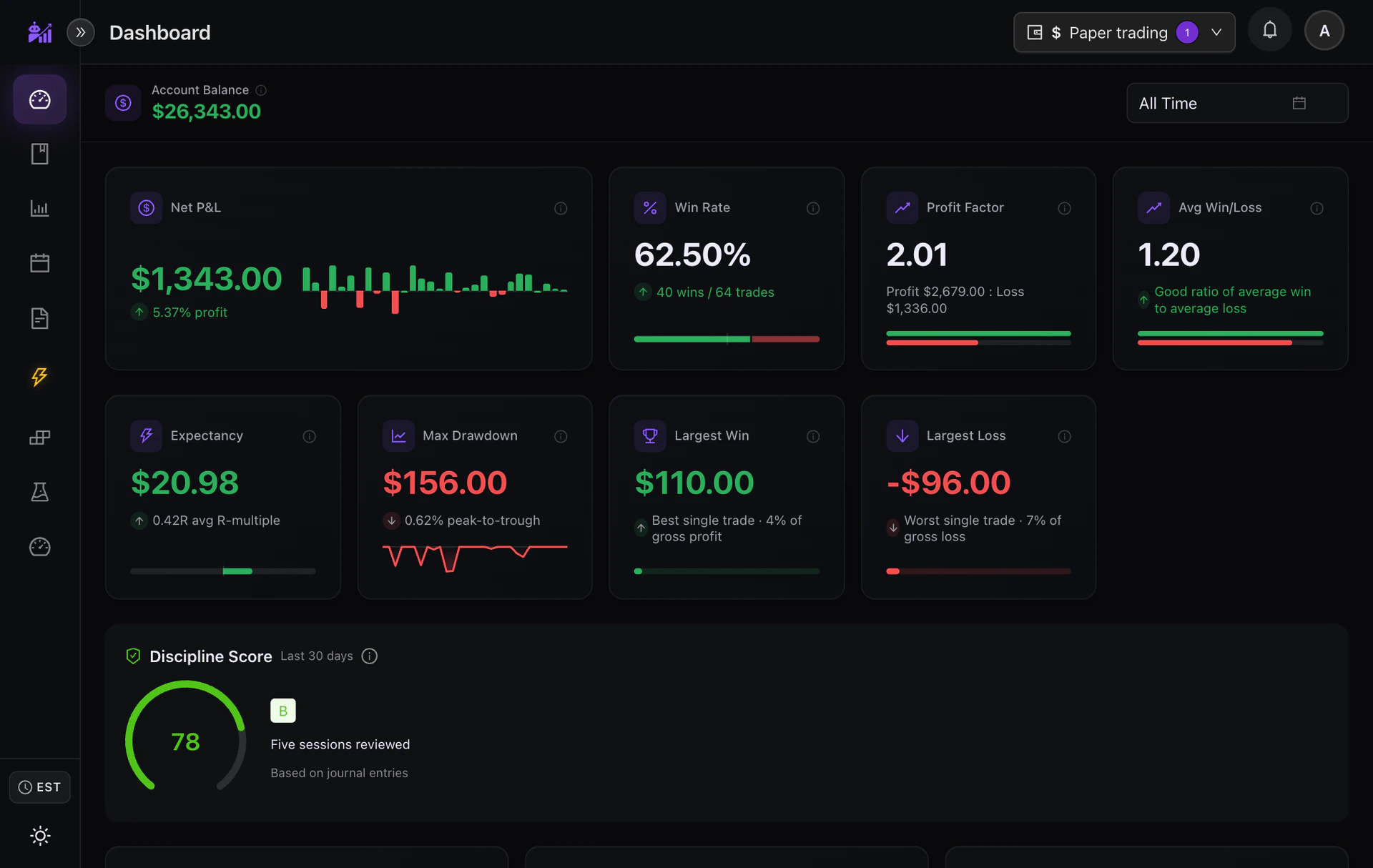
Why do traders need a trading journal?
Because the data on unstructured trading is stark. A January 2023 study by SEBI, India's securities regulator, found that 89% of individual traders in the equity futures and options segment lost money in FY22, with an average net loss of about ₹1.1 lakh. SEBI's September 2024 follow-up reported that 93% of individual F&O traders lost money between FY22 and FY24, with aggregate losses exceeding ₹1.8 lakh crore. Academic research points the same way: the Barber and Odean study "Trading Is Hazardous to Your Wealth" (Journal of Finance, 2000) found that the most active individual traders underperformed the market by roughly 6.5 percentage points per year, largely due to overtrading.
A journal does not guarantee profits—nothing does. What it provides is evidence: which setups have positive expectancy, which sessions or instruments drain your account, and which behaviors (revenge trading, oversizing, moving stops) repeat. TradingEdge structures that evidence and uses AI to surface the patterns, so the review process professional desks rely on becomes practical for individual traders.
How do you start journaling with TradingEdge?
Step 1: Create a free account
Sign up at dash.tradingedge.app. The free plan includes unlimited trade records and one trading account—no payment card required.
Step 2: Import or add your trades
Connect MetaTrader 4/5 for automated sync, use Zerodha Kite for Indian markets, upload a supported broker CSV, or enter trades manually.
Step 3: Journal the context behind each trade
Record the setup, planned risk, screenshots, tags, mistakes, confidence, and emotions—not only the entry, exit, and P&L.
Step 4: Review AI analytics and psychology insights
Use dashboards and AI summaries to compare performance by setup, session, instrument, and behavior, and identify patterns worth investigating.
Step 5: Turn findings into rules and backtest them
Document entry, exit, invalidation, and risk rules in the strategy builder, then backtest them against historical data before risking capital.
How much does TradingEdge cost?
Black Friday pricing is available for a limited time on Starter and Pro. Yearly plans are paid in one annual charge.
| Plan | Price | Highlights |
|---|---|---|
| Free | ₹0 forever | Unlimited trade records, one account, basic analytics, weekly AI summary |
| Starter | ₹499 monthly, or ₹199/month billed yearly at ₹2,388 | More accounts, advanced analytics, 100 monthly AI credits, strategy builder, backtesting, replay, CSV import/export |
| Pro | ₹799 monthly, or ₹499/month billed yearly at ₹5,988 | Expanded account and AI capacity, priority support |
How does TradingEdge compare to TradeZella?
Both platforms cover the core journaling workflow—automated MT4/MT5 sync, backtesting, trade replay, and AI analysis. The main differences are price, India-market support, and a few features unique to each:
| Capability | TradingEdge | TradeZella |
|---|---|---|
| Price | ₹499 monthly · ₹199/mo billed yearly | $35–$99/mo |
| Free plan | Yes, free forever | No |
| Automated MT4/MT5 journaling | Yes | Yes |
| Zerodha Kite (India) sync | Yes | No |
| Backtesting on entry plan | Yes | Limited |
| AI strategy builder | Yes | No |
| International broker integrations | Growing list | More extensive |
| Android app | Yes | Yes |
TradeZella is a trademark of its respective owner and is not affiliated with TradingEdge. See the full comparison for details.
Which markets and brokers does TradingEdge support?
TradingEdge is market-agnostic. Traders use it to journal stocks, options, futures, forex, cryptocurrency, commodities, and indices—including NSE and BSE listed equities and derivatives in India, prop-firm forex accounts on MetaTrader, and crypto positions. Supported import paths include automated MetaTrader 4/5 sync, Zerodha Kite, Interactive Brokers, TradingView, and CSV exports from common brokers, with manual entry always available. See the integrations page for the current list, and the trading journal guides for market-specific setups.
Frequently asked questions
What is TradingEdge?
TradingEdge is a trading journal with performance analytics, an AI copilot, and tools for building and backtesting strategies.
Does TradingEdge provide trading signals or financial advice?
No. TradingEdge helps you review your own trades. It does not recommend investments, send trading signals, or execute orders.
What can I record in the trading journal?
Record entries, exits, position size, risk, and setups. Add screenshots, notes, tags, and emotions to remember what shaped each decision.
How does TradingEdge use AI?
Ask the copilot about your journal or use AI summaries to spot patterns in your trades.
Can I build and backtest a trading strategy?
Yes. Define entry, exit, and risk rules in the strategy builder, then test them against historical data.
Which markets can I journal?
Journal stocks, options, futures, forex, crypto, commodities, and indices. Supported imports vary by broker.
How can I import trades?
Enter trades manually or upload a supported broker CSV. See integrations for supported brokers and sync options.
How does TradingEdge compare to TradeZella?
Compare pricing, broker sync, replay, and backtesting in the side-by-side feature table.
Is there a free plan and a mobile app?
Yes. Free includes one account and unlimited trade records. Your journal works on the web and Android. iOS is planned.